

There is nothing more frustrating than finishing a massive freelance project, sending off the final files, and then… crickets. You wait 30, 60, or even 90 days for the client to finally mail you a check. As a solopreneur, your cash flow is the lifeblood of your operation; when clients drag out payment, your entire business stalls.
If you are still creating manual PDF invoices in Microsoft Word or tracking your business expenses in a messy Excel spreadsheet, you are actively hurting your cash flow. In 2026, clients expect a seamless, digital payment experience similar to buying a product online. They want one-click credit card processing, Apple Pay, Google Pay, and automatic bank transfers. If you make it hard for them to pay, they will put it off. It is that simple.
Furthermore, without proper software, tax season becomes an agonizing puzzle of lost receipts, forgotten expenses, and panicked emails to your CPA. A business cannot be optimized for growth if the back-office operations are stuck in 2012.
To run a highly profitable 1099 business, you need software that handles the heavy lifting for you. From generating automatic late-fee reminders to categorizing tax write-offs in real-time, modern financial tech is your best unhired employee. Here are the 5 best invoicing and bookkeeping tools for freelancers that will get you paid faster, organize your cash flow, and make tax season a total breeze.
- Client Experience Matters: Clients expect one-click payment options (Apple Pay, credit cards) to pay you immediately.
- The Tax Advantage: Real-time expense tracking via bank syncing ensures you don’t miss deductions at tax time.
- Automation is Key: Modern tools handle the awkward job of chasing late payments automatically so you don’t have to.
- The Commingling Rule: Always connect your invoicing software to a dedicated business bank account, never your personal one.
In This Guide
1. FreshBooks: Best for Pure Invoicing & Client Experience
If your primary goal is to send beautiful, professional invoices that clients can pay with a single click, FreshBooks is the undisputed king. Most legacy accounting platforms were built for large corporations and modified for small businesses as an afterthought. FreshBooks was built from the ground up specifically for service-based freelancers, designers, writers, and consultants.
When you send a FreshBooks invoice, it doesn’t look like a dry, cryptic financial document. It looks like a sleek, modern web page tailored to your branding. You can fully customize the colors, typography, and logo formatting to ensure the final touchpoint with your client represents your brand’s quality.
Key Features for Freelancers:
- Client Portal: Clients get an online portal where they can view past invoices, download receipts, and keep track of project payments.
- Proposal to Invoice: Write a project proposal, send it for electronic signature, and have it instantly convert into an activated invoice immediately upon signing.
- Expense Tracking: Snap photos of paper receipts or connect your bank feed to automatically import categorizations.
FreshBooks Pros and Cons:
- Pros: The most intuitive user interface on the market. Excellent customer support and visually stunning invoice templates. Follow-up emails are fully automated.
- Cons: Lower tier plans strictly limit the number of active billable clients. If you have many small, one-off clients, it can get pricey.
Best Feature: Automated late payment reminders. You can set the software to politely email the client on day 3, day 15, and day 30 past due, optionally adding a 5% late fee automatically. The software chases the client, so you don’t have to play the bad guy.
The 2026 Edge: Built-in time tracking that automatically converts your billable hours directly into a ready-to-send invoice. You can run a timer directly from your web browser or phone, assign the time to a specific client project, and bill it at the end of the month with zero manual data entry.
2. QuickBooks Solopreneur: Best for Tax Preparation
Intuit recently upgraded their popular “Self-Employed” tier to QuickBooks Solopreneur, and it is a tax-saving machine specifically calibrated for single-member LLCs and 1099 independent contractors. Because Intuit also owns TurboTax, and because almost every CPA in the country uses QuickBooks, this is the safest, most reliable choice if you want bulletproof accounting.
While QuickBooks may not have the purely aesthetic invoicing elements of FreshBooks, it excels in raw financial accuracy. It is designed to automatically segregate your business operations to ensure you capture every possible legal tax deduction, lowering your end-of-year tax liability significantly.
Key Features for Freelancers:
- Mileage Tracking: The mobile app runs silently in the background, using GPS to track your driving. Swipe left or right to signify if a trip was for business or personal, instantly logging your IRS mileage deduction.
- Estimated Taxes: It constantly monitors your incoming 1099 revenue and gives you a running quarterly estimate of exactly what you will owe the IRS, so there are no surprises in April.
- TurboTax Integration: With one click at the end of the year, all your categorized schedule C data maps cleanly into TurboTax or gets exported natively for your accountant.
QuickBooks Solopreneur Pros and Cons:
- Pros: Maximum tax compliance and CPA friendliness. Deep integration with almost every bank and financial institution. Best mileage tracker on the market.
- Cons: The interface can occasionally feel overwhelming due to the sheer volume of features. Pricing frequently increases after promotional introductory periods.
Best Feature: The famous swipe-to-categorize interface. The mobile app lets you swipe left or right on transactions to instantly categorize them as “Business” or “Personal,” gamifying your daily bookkeeping.
The 2026 Edge: AI-driven receipt scanning. The latest iteration uses advanced OCR (Optical Character Recognition) to not just read your receipts, but intuitively understand context, automatically matching your photos to your exact bank transactions without manual linking.
3. Wave: Best 100% Free Option for Beginners
If you are a brand new freelancer on a tight budget, Wave is the absolute best answer. Unlike almost every other platform that only offers restrictive 14-day free trials, Wave’s core invoicing and accounting software is completely free forever. It is not a trial; it is a permanent free tier.
Starting a freelance business has a lot of hidden overhead, and stripping out software costs while you are securing your first few clients is vital. Wave provides full double-entry accounting tools along with sleek, customizable invoices for zero monthly recurring fees.
Key Features for Freelancers:
- Zero Monthly Fees: Create unlimited invoices and track unlimited income/expenses for an unlimited number of clients without paying a dime.
- Dashboard Analytics: Excellent visual charts that show cash flow trends, invoice status (viewed, unpaid, paid), and expense breakdowns over time.
- Multi-Business Support: If you run a side hustle baking cakes and another side hustle consulting, you can run multiple businesses under one free login.
Wave Pros and Cons:
- Pros: It is free forever for the core tools. Highly capable built-in invoicing system. Clean, minimalist user interface.
- Cons: Customer support is limited on the free tier. Lacks some advanced integrations and heavy automation that paid tools offer.
Best Feature: Unlimited invoicing and unlimited expense tracking for zero monthly fees.
The Catch (How they make money): They make their money by charging slightly higher credit card processing fees (and ACH bank transfer fees) when a client pays your invoice using their integrated payment gateway. You essentially pay per transaction rather than a monthly software subscription. But if you are just starting and volume is low, the lack of a monthly subscription is an absolute lifesaver.
4. HoneyBook: Best All-In-One for Creatives
HoneyBook isn’t just a basic bookkeeping apparatus; it is a complete Client Relationship Management (CRM) tool wrapped around an invoicing engine. It is incredibly popular with freelance creatives—photographers, graphic designers, wedding planners, and videographers—because it handles the entire client journey from the first inquiry to final delivery.
If your work involves heavier client interaction, custom project pitching, and legally binding contracts, HoneyBook removes the need to patch together separate software tools (like combining DocuSign, MailChimp, and PayPal).
Key Features for Freelancers:
- Smart Files: Create interactive digital brochures that allow a client to select custom services, review a bespoke proposal, sign the contract, and pay all in a single document flow.
- Meeting Scheduler: Send a scheduling link linked directly to your calendar, allowing prospects to book discovery calls without constant back-and-forth emails.
- Client Run-of-Show: Keep all project notes, emails, invoices, and deliverables cleanly organized under one unified project dashboard.
HoneyBook Pros and Cons:
- Pros: Incredible seamlessness from inquiry to payment. Extremely professional and impressive aesthetic presentation. Robust automation capabilities.
- Cons: A steeper learning curve to get fully set up. Not a native double-entry accounting software, so it’s less ideal for complex tax preparation compared to QuickBooks.
Best Feature: You can send a single “Smart File” link that includes the marketing pitch, the project proposal, the legally binding contract to sign, and the initial deposit invoice all securely on one page.
The 2026 Edge: Incredible automation workflows. You can program HoneyBook to trigger customized onboarding emails, questionnaires, or welcome packets the exact second an initial deposit invoice is paid.
5. Xero: Best for Scaling Agencies
If you are planning to transition from a solo freelancer to an agency owner who will eventually hire other 1099 sub-contractors, virtual assistants, or employees, Xero is built to scale with you. Hailing from New Zealand, it is a robust, cloud-based platform that heavily rivals QuickBooks globally but often offers a slightly cleaner, more modern interface.
Xero is a powerhouse. It is built for complex financial operations, inventory management, and deep banking reconciliation, making it perfect for e-commerce solopreneurs, digital marketing agencies, and scaling tech consultants.
Key Features for Freelancers:
- Bank Reconciliation: It smartly remembers your previous categorizations, so clearing out dozens of bank transactions takes mere seconds.
- Inventory Management: Unlike many basic freelancer tools, Xero handles stock tracking seamlessly.
- Project Profitability: Advanced job costing features allow you to track time and expenses against specific projects to see exactly how much profit margin you made per client.
Xero Pros and Cons:
- Pros: Extremely strong integration marketplace. Very powerful for businesses that carry inventory or use multiple currencies. Unlimited users (including read-only access for accountants).
- Cons: Can be overkill for a casual, part-time freelancer. Lower pricing tiers strictly limit the number of invoices you can send per month.
Best Feature: Extremely powerful project pacing, deep reporting capabilities, and flawless multi-currency support if you frequently work with international clients across borders.
The 2026 Edge: Limitless integration. It boasts an ecosystem of over 1,000 third-party business apps, connecting flawlessly with tools like Shopify, Stripe, Gusto, and various CRM platforms.
First rule of freelance finance: You cannot properly use bookkeeping software if your personal and business money are mixed together. Commingling funds destroys your liability protection and makes your taxes a nightmare.
Before you sign up for any of these tools, make sure you have opened a dedicated business checking account. Check out our guide on the 5 Best Free Business Bank Accounts for Freelancers. Once your dedicated account is physically open, connect it directly to your new invoicing software to ensure every logged transaction is 100% tax-related!
Which Freelance Software Should You Choose?
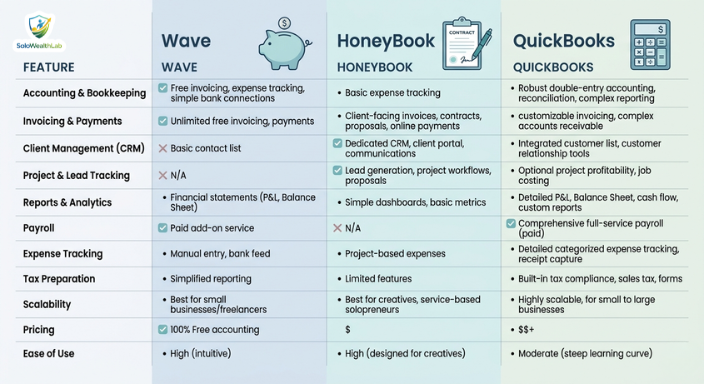
Choosing the best invoicing and bookkeeping tool for your freelance hustle depends entirely on your immediate needs, your projected growth, and your current budget. To summarize:
- If you have zero budget right now and just need to get off the ground, start with Wave.
- If you want the most professional, visually stunning, easy-to-use invoices, choose FreshBooks.
- If you want bulletproof tax liability defense and deeply integrated expense tracking, go with QuickBooks Solopreneur.
- If you frequently pitch projects, send contracts, and require heavy client onboarding, HoneyBook will change your life.
- If you are running a scaling agency, utilizing sub-contractors, or managing inventory, Xero is your workhorse.
Whichever tool you choose, the ultimate goal remains the exact same: stop wasting precious hours on manual administrative paperwork. Automate your income, optimize your taxes, and spend that extra newly found time finding higher-paying clients or actually executing the work you love!
Frequently Asked Questions (FAQ)
Do I really need accounting software as a freelancer?
Yes. While spreadsheets work momentarily when you have only one or two clients, they lack automation. Dedicated accounting software saves you hours of manual data entry, prevents lost tax deductions by automatically scanning your bank feed, allows clients to pay via credit card, and provides legally defensible financial records if you are ever audited by the IRS.
What is the difference between invoicing software and bookkeeping software?
Invoicing software is primarily focused on the generation of bills, processing payments, and managing accounts receivable (money coming in). Bookkeeping or accounting software tracks the entire financial picture, including tracking business expenses, generating profit and loss statements, reconciling bank feeds, and organizing tax categories (money coming in and money going out). Tools like QuickBooks and Wave do both.
Are the transaction fees for credit cards worth it?
Standard credit card processing fees hover around 2.9% + $0.30 per transaction. While giving up nearly 3% of your gross invoice hurts, data shows that invoices offering an integrated “Pay Now” button get paid significantly faster. Getting cash in hand in 2 days at a 3% loss is often strategically better for a solopreneur than waiting 60 days for a paper check.
Can I use Venmo or Zelle instead of these invoicing apps?
While Venmo (Business) and Zelle can facilitate rapid transfers, using personal accounts for business transactions violates their terms of service and commingles your funds. Furthermore, neither platform easily generates the professional PDF receipts that corporate clients require for their own accounting departments. Professional invoicing software establishes immediate market credibility.
Is it hard to switch accounting software later?
Not extremely, but it is tedious. Most major platforms allow you to export your data (customers, products, chart of accounts) via CSV and import it into a competitor platform. However, porting over historical invoice data and past bank reconciliations perfectly is rarely smooth. It is highly advised to pick a platform you can scale with rather than jumping ship every year.